- White-labeled for your company
Your company's intranet. Already built.
The same portal your team uses for annual compliance training becomes your employee portal. Add your logo, upload your handbook, policies and videos, and assign them to your team. Everyone logs in to a portal with your name on it.
Training · Documents · Videos · Onboarding · Announcements
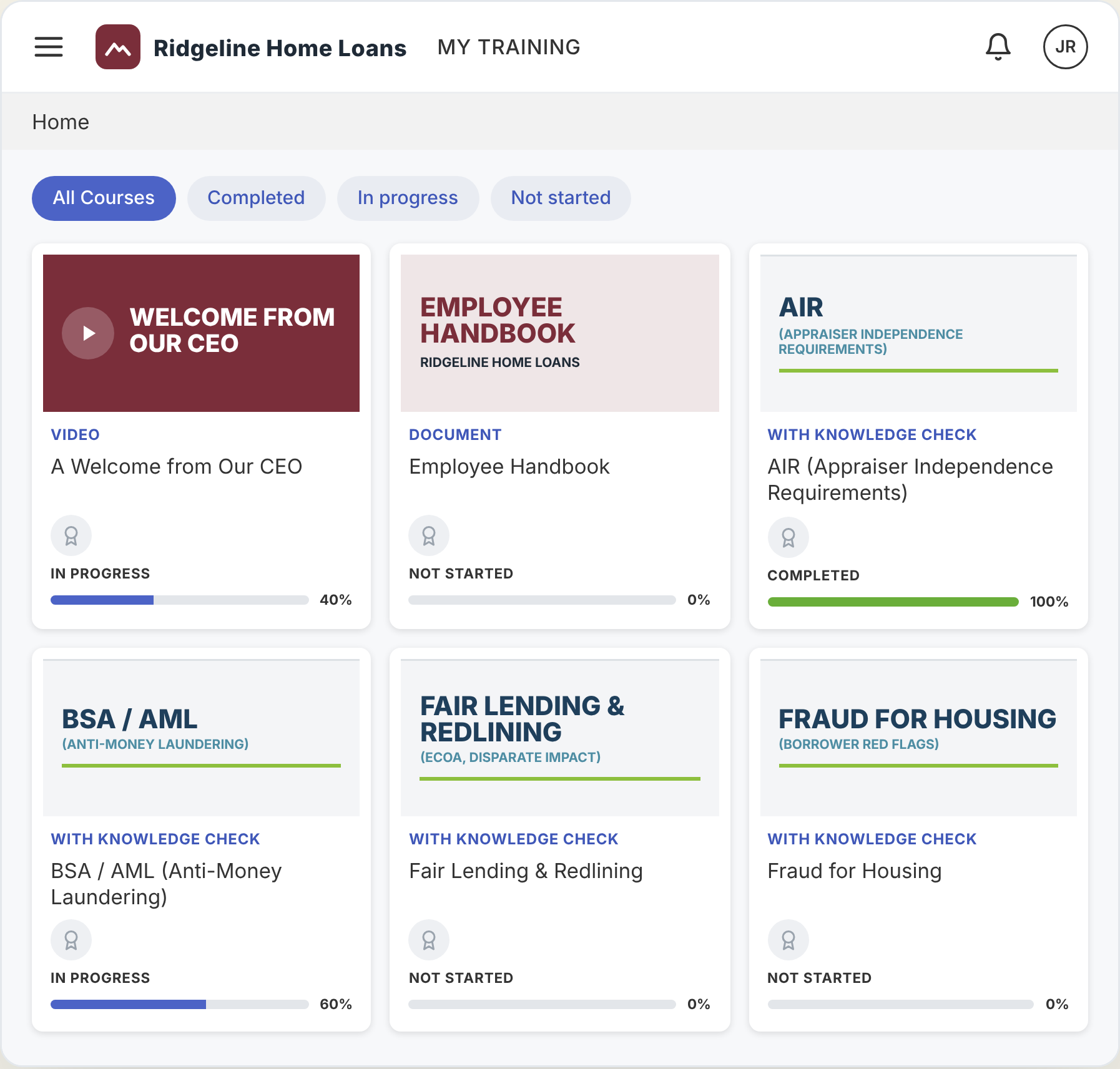
Sample portal for a fictional lender. Your logo goes top left, and your own videos and documents sit beside the compliance courses.
Why it matters
Big companies have an intranet. You have email attachments.
Growing shops rarely have an HR department or an IT team to set up an employee portal. So the handbook goes out as a PDF, onboarding lives in someone’s head, and there’s no record of who read what.
Lost in the inbox
An emailed handbook gets buried under rate sheets and borrower emails, and nobody can find it when they need it.
Day one, in two places
New hires take compliance training in one system, then get handed a binder, a shared drive link and a list of videos for everything else.
Scattered everywhere
Training in one place, policies in a shared drive, announcements in a group text. Nothing in one spot.
The fix
One branded portal for everything your team needs to read, watch and complete, with their assigned courses tracked in your training matrix.
What goes in your portal
Our training. Your content. One login.
Your team’s annual compliance training is already there. Add anything else you want them to read, watch or complete.

Built in
Annual compliance training
All 12 Simply Compliant courses, assigned and tracked automatically. All 12 in year one to set a baseline, then one a month starting in January.

From the Toolkit
Your Employee Handbook
Build your handbook with the Toolkit, then assign it to your team to review. When you update it, assign the new version.

Your upload
Policies and internal documents
Upload any company document you want your team to read: procedures, job aids, IT and security policies. It sits in their assignments until they review it, then moves to their completed documents.

Your upload
Videos and custom courses
A welcome video from your CEO, a walkthrough of your loan process, training specific to your market. Upload it and add it to your team’s assignments.

Onboarding
Day-one training
Load the training every new hire needs on their first day, like your loan process, systems walkthroughs or company policies. They take it right alongside their baseline compliance training, all in one place.

Intranet
Announcements and resources
Post company news and keep a resource library of links and files (org chart, benefits, forms) so your team knows where to look.
White-labeled
It looks like yours because it is.
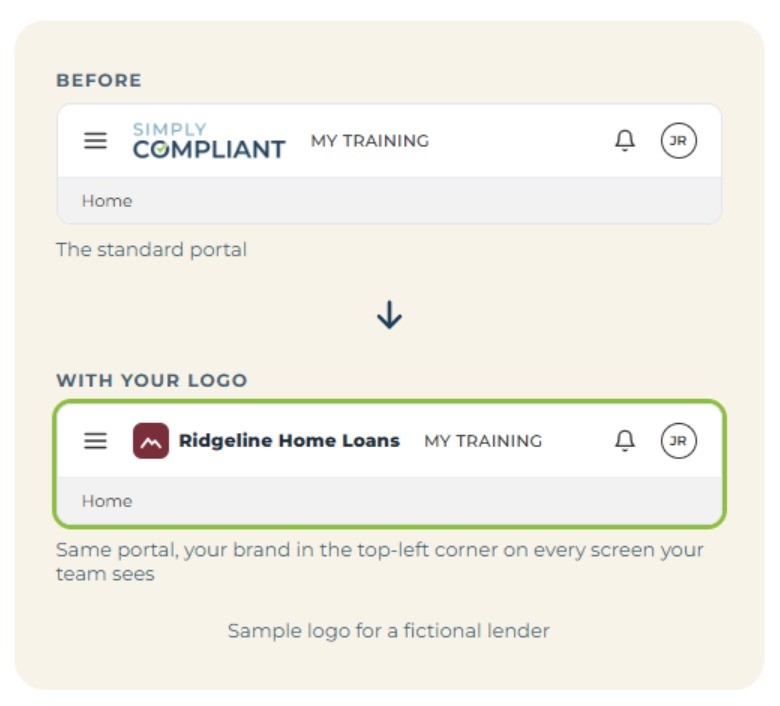
Once your team signs in, your logo sits in the top-left corner of every screen. It feels like your company’s portal, not a vendor’s training site.
- Your company logo on the portal, added by your Account Owner in a couple of clicks.
- Branch logos for branches that operate under their own name, added by the Branch Admin.
- Your content front and center: your handbook, your videos and your news sit right beside the compliance training.
How it works
Set it up once. Your team takes it from there.
01
Brand it and add your team
Upload your logo, set up your branches and add your employees. Compliance training is assigned automatically.
02
Add your content
Upload documents and videos, assign your Toolkit handbook, build onboarding paths and post announcements. Assign each item to the people who need it.
03
Track training progress
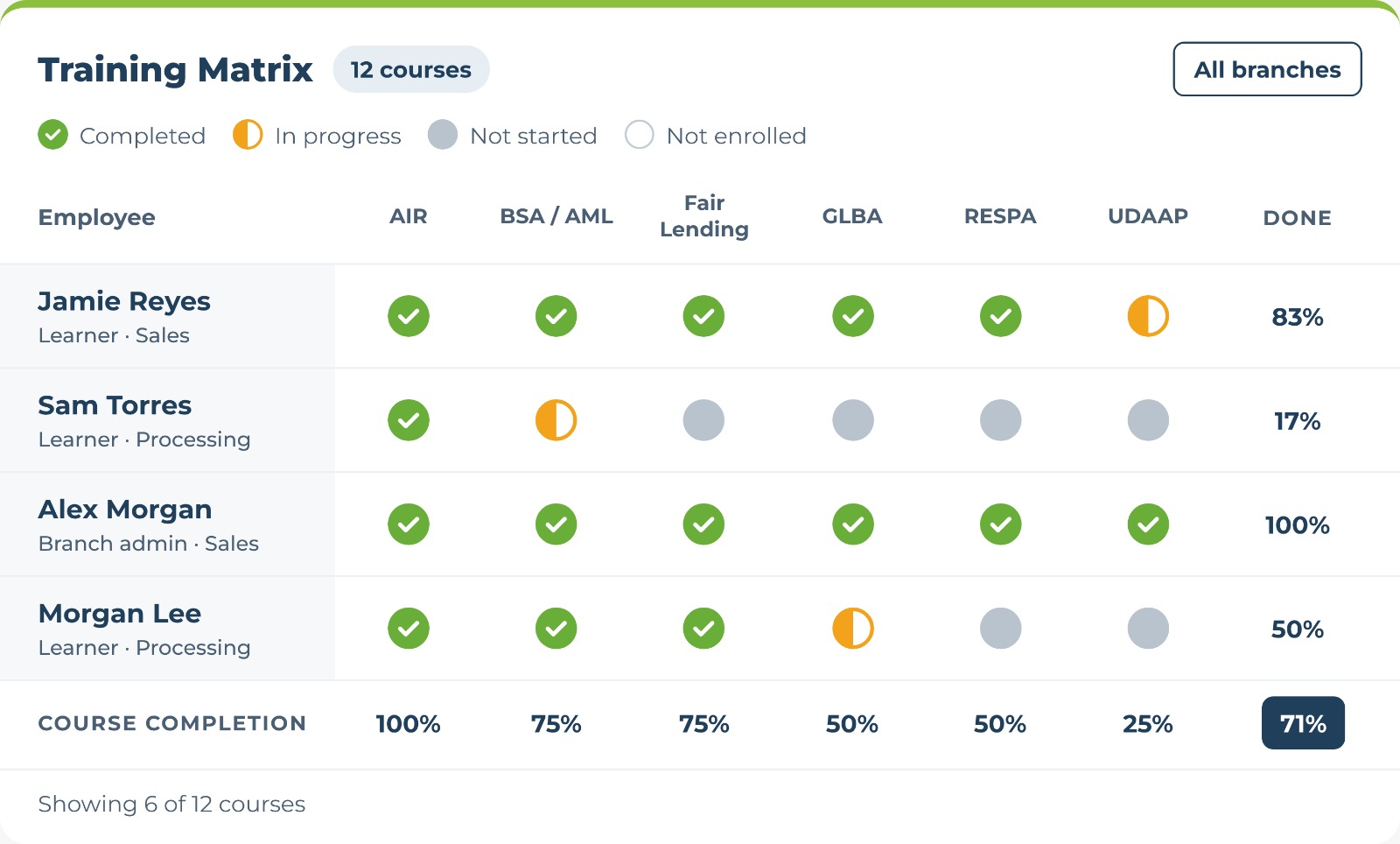
Assigned courses are tracked in the training matrix in your Client Dashboard. Employees keep everything they’ve reviewed in their completed documents.
Training matrix
Know where your team stands on training.
Assigned courses show up in your training matrix. Filter by employee, branch or course to see who’s done and who still has work to do.
Uploaded documents, announcements and resources live in each employee’s portal and aren’t tracked in the matrix.
White-labeled
Want a custom course but don't have time to build it?
Our team can create a custom course for you, like company-specific procedures or training for your market, for a small fee quoted based on what you need.
1
Tell us what you need
Share your topic, your materials and who the course is for.
2
We build the course
Our team turns it into a polished course in the same style as your compliance training.
3
It shows up in your portal
Your custom course is loaded into your portal, ready to assign to your team.
Included with every plan
Training, policies and your employee portal. One platform.
The Employee Portal runs on the same platform as your team’s compliance training and the Compliance Toolkit, so everything your employees need lives behind one login.
The Employee Portal is included with every plan, at no extra cost.
Questions
Employee Portal FAQ
Inside the portal, no. Once you upload your logo, the portal is branded with your company name. System emails and completion certificates still come from Simply Compliant.
You can upload PDF, Word, Excel, PowerPoint, TXT, CSV and image files up to 15MB, plus videos like a CEO welcome or a process walkthrough.
You can assign content to your whole company, to a specific branch, or to new employees automatically as they’re added.
Courses assigned in the training matrix, including your annual compliance training, are tracked there. Uploaded documents stay in each employee’s assignments until they review them, then move to their completed documents. Announcements and resources are there for reference and aren’t tracked.
Yes. We create custom courses for a small fee. Complete the Custom Course request form for a quote.
Contact Us for a Quote →
Give your team a place that feels like home base.
Compliance training, company policies and your own content, under your name.